CONVOLUTIONAL NEURAL NETWORK
Introduction
A Convolutional Neural Network (CNN) is a type of Deep Learning algorithm mainly used for processing and analyzing images.
CNNs are designed to automatically learn important features from images, such as edges, shapes, textures, and objects. They are widely used in Computer Vision tasks like image classification, face recognition, object detection, and medical image analysis.
Why Do We Need CNNs?
Computers do not see images the way humans do.
An image is simply a matrix of numbers (pixel values) for a computer.
For example:
- A grayscale image contains pixel values from 0 to 255
- A color image contains RGB values
Traditional Neural Networks become inefficient for image processing because images contain a very large number of pixels.
CNNs solve this problem by:
- reducing the number of parameters
- extracting important features automatically
- preserving spatial relationships in images
Introduction to Neural Networks
A Neural Network is a computational model inspired by the working of the human brain.
It is one of the fundamental concepts of Artificial Intelligence (AI) and Machine Learning (ML).
Neural Networks are designed to recognize patterns, learn from data, and make predictions or decisions.
They are widely used in:
Image Recognition
Speech Recognition
Language Translation
Recommendation Systems
Medical Diagnosis
Stock Prediction
Inspiration from the Human Brain
The human brain contains billions of neurons connected together.
Each neuron:
receives information
processes it
passes it to other neurons
Similarly, an Artificial Neural Network consists of interconnected units called artificial neurons.
These neurons work together to solve complex problems.
Basic Structure of a Neural Network
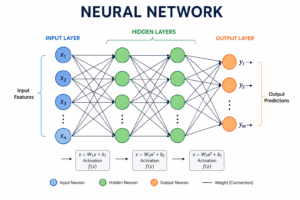
A Neural Network mainly contains three types of layers:
Input Layer
Hidden Layer(s)
Output Layer
1. Input Layer
The Input Layer receives data from the outside world.
For example:
image pixels
numerical values
text data
If a dataset contains 5 features, then the input layer will have 5 neurons.
2. Hidden Layer
Hidden Layers perform calculations and extract patterns from data.
A Neural Network may contain:
one hidden layer
multiple hidden layers
When many hidden layers are used, it is called Deep Learning.
Each neuron in the hidden layer:
receives inputs
applies weights
adds bias
uses an activation function
produces output
3. Output Layer
The Output Layer gives the final result.
Examples:
Spam or Not Spam
Cat or Dog
Price Prediction
Digit Recognition
Working of a Neural Network
The working process can be understood in simple steps.
Step 1: Input Data
Data is fed into the network.
Example:
student marks
house price data
image pixels
Step 2: Weighted Sum
Each input is multiplied by a weight.
The weighted sum is calculated as:
z=w_1x_1+w_2x_2+\cdots+w_nx_n+b
Where:
(x) = input values
(w) = weights
(b) = bias
Weights determine the importance of each input.
Step 3: Activation Function
The result is passed through an activation function.
It decides whether a neuron should activate or not.
A commonly used activation function is ReLU:
f(x)=\max(0,x)
Activation functions introduce non-linearity, allowing the network to learn complex patterns.
Step 4: Output Generation
The final processed value becomes the output.
Example:
probability of an email being spam
predicted house price
identified object in an image
Training a Neural Network
Neural Networks learn by adjusting weights and biases.
The training process involves:
Forward Propagation
Loss Calculation
Backpropagation
Weight Update
This process repeats multiple times until the model improves accuracy.
Forward Propagation
Data moves from:
Input Layer → Hidden Layer → Output Layer
Predictions are generated.
Loss Function
The network compares:
predicted output
actual output
The difference is called loss or error.
Example:
\text{Loss}=\frac{1}{n}\sum(y-\hat{y})^2
A smaller loss means better predictions.
Backpropagation
Backpropagation is the process of updating weights to reduce error.
The network learns from mistakes and improves over time.
Types of Neural Networks
Some important types are:
| Type | Application |
|---|---|
| Feedforward Neural Network | Basic prediction tasks |
| Convolutional Neural Network (CNN) | Image processing |
| Recurrent Neural Network (RNN) | Sequential data |
| LSTM | Time-series and NLP |
| Transformer Networks | Modern language models |
Advantages of Neural Networks
1. Learns Complex Patterns
Can solve problems difficult for traditional algorithms.
2. Automatic Feature Learning
Learns useful features directly from data.
3. High Accuracy
Performs well on large datasets.
4. Versatile
Applicable in many domains.
Disadvantages of Neural Networks
1. Requires Large Data
Needs significant training data.
2. Computationally Expensive
Training can take a long time.
3. Black Box Nature
Decision-making is difficult to interpret.
Real-Life Applications
Neural Networks are used in:
Virtual Assistants
Self-Driving Cars
Fraud Detection
Medical Imaging
Language Translation
Chatbots
Recommendation Systems
Introduction to Computer Vision
Computer Vision is a branch of Artificial Intelligence (AI) that enables computers to understand and analyze images and videos similarly to human vision. It allows machines to identify objects, recognize faces, detect movements, and extract meaningful information from visual data.
Computer Vision combines concepts from AI, Machine Learning, Deep Learning, and Image Processing to solve real-world visual problems.
Why Computer Vision is Important
Humans can easily recognize objects, people, and scenes using their eyes and brain. Computers, however, only understand numerical data. Computer Vision helps machines interpret visual information and make intelligent decisions automatically.
For example, a self-driving car can detect pedestrians, traffic signs, and vehicles using Computer Vision systems.
How Computer Vision Works
Computer Vision systems generally follow these steps:
1. Image Acquisition
The system captures images or videos using cameras, sensors, or scanners. These images act as the input for processing.
2. Image Preprocessing
Raw images may contain noise, blur, or poor lighting. Preprocessing improves image quality using techniques like resizing, grayscale conversion, filtering, and enhancement.
3. Feature Extraction
The system extracts important patterns from the image such as edges, textures, shapes, and colors. Modern Computer Vision models use Deep Learning techniques like CNNs for automatic feature extraction.
4. Object Detection and Recognition
After extracting features, the system identifies and classifies objects present in the image.
Examples include:
face recognition
vehicle detection
handwritten digit recognition
5. Decision Making
Finally, the system generates meaningful output such as:
“Face Detected”
“Tumor Found”
“Traffic Sign Recognized”
Relationship Between Computer Vision and CNN
Computer Vision is a broad field focused on visual understanding, while Convolutional Neural Networks (CNNs) are Deep Learning models commonly used to solve Computer Vision problems.
CNNs help machines automatically learn visual features from images and improve recognition accuracy.
Common Tasks in Computer Vision
Image Classification
Assigning a label to an image.
Example: Cat, Dog, Car, or Human.
Object Detection
Identifying both the object and its location within the image.
Example: Detecting multiple cars in a traffic image.
Image Segmentation
Dividing an image into meaningful regions for detailed analysis.
Widely used in medical imaging and satellite imaging.
Face Recognition
Recognizing or verifying human faces in images or videos.
Used in smartphone unlocking and security systems.
Motion Detection
Tracking moving objects in videos.
Common in surveillance and sports analytics.
Applications of Computer Vision
Computer Vision is widely used across different industries.
Healthcare
tumor detection
X-ray analysis
medical image processing
Automotive
self-driving cars
lane detection
traffic sign recognition
Security
facial recognition
surveillance systems
Agriculture
crop monitoring
disease detection
Retail
automated checkout systems
product identification
Social Media
image filters
automatic tagging
CNN Mastery Roadmap
Interactive Deep Learning Knowledge Map
